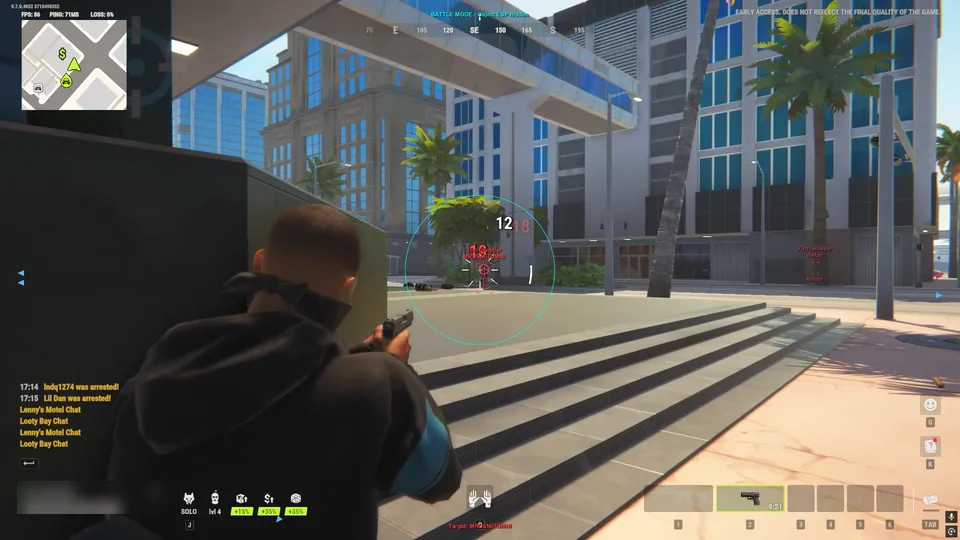
Rob Run Mod Menu: What's Inside RAID, KEYCARD and DECODER
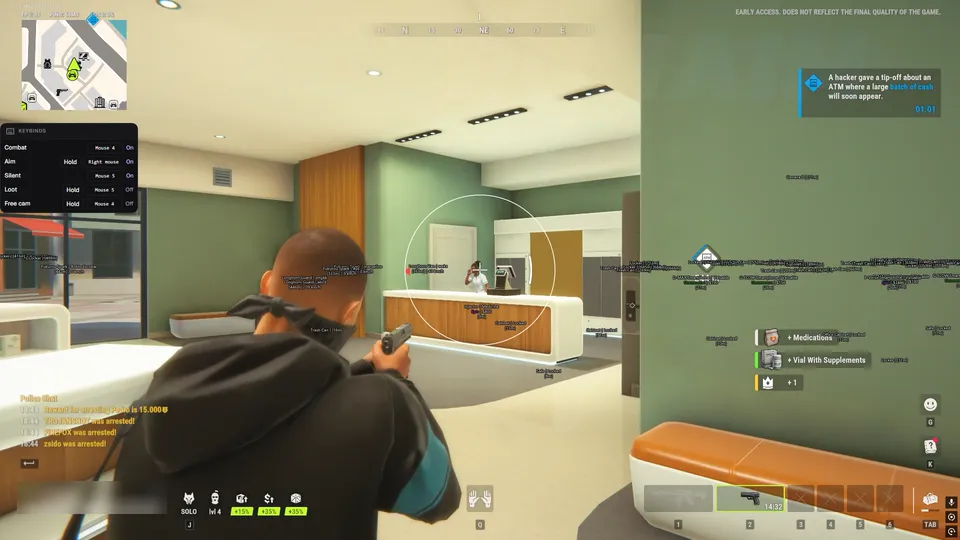
A mod menu is a window that sits on top of Rob Run. You press Insert, it opens, you tick what you want, you press Insert again and it's gone. What you ticked stays on screen as an overlay: boxes on players, labels on loot, a circle around your crosshair.
That's the same in all three Rob Run mod menus, RAID, KEYCARD and DECODER. The difference is what's on the list, so this page goes through the menu one part at a time and says which of the three has what. Everything below comes from each menu's own feature list. Where a table shows a dash, that menu's list doesn't name the option.
Rob Run aimbot: the part people buy a mod menu for
Every one of the three has an aimbot that works on a key you bind. You choose the bone it goes for and the size of the FOV circle.
RAID keeps it simple. Two modes, lock and silent, on hold or toggle, plus prediction, a visible check, auto fire, a maximum distance, and it ignores your own party.
KEYCARD is the one built around aim. On top of FOV you get a dead zone, smoothing, speed and stickiness, a delay before it switches target, and role filters, so it can leave civilians, cops or criminals alone. Its silent aim has its own separate settings: its own FOV, its own bone, its own role filters, auto shot and a shot delay. KEYCARD also binds to a controller, which the other two don't.
DECODER sits between them. You pick target categories and bones, and you can have it choose random bones with a head chance you set. It has smoothing, prediction with a lead time, a target priority and a team check.
If you don't know what half of those words do yet, our shop's aimbot settings guide explains each one with numbers to start from.
Rob Run player ESP: who is behind that wall
ESP is the overlay that marks players through walls, and in Rob Run that means every cop and every robber on your street. In a game where all the cops and all the robbers are people, it's the option you'll leave on longest.
| Option | RAID | KEYCARD | DECODER |
|---|---|---|---|
| Box | Yes | – | Yes |
| Skeleton | Yes | Yes | Yes |
| Head marker | – | Head circle | Yes |
| Name | Yes | Yes | Yes |
| Role | Yes | Yes | Wanted status |
| Weapon or held item | Weapon, ammo | Held item | Weapon |
| Health and armor | Yes | – | Yes |
| Clan tag | Yes | – | – |
| View direction | – | Yes | – |
| Off-screen arrows | Yes | Yes | – |
| Snaplines | Yes | – | Yes |
Two rows there matter more in Rob Run than they would in another shooter.
Role is the first. You become a criminal the moment you put a mask on, and until then you're a civilian nobody has a reason to shoot. A label that says cop, criminal or civilian tells you who to worry about. DECODER goes one step further and shows wanted status.
Clan tag is the second, and only RAID has it. Clans hold up to 100 players and fight over districts, so seeing a tag is often more useful than seeing a name.
Rob Run loot ESP: is this place worth the alarm
Looty Bay is full of places to hit, from corner stores to bank vaults, and Kefir says the same place can pay very differently depending on what you bring. Loot ESP answers the question before you open the door.
- RAID marks drawers, containers, loose loot, loot bags, cash and cargo, and shows a loot value.
- KEYCARD marks cash, containers and loot, and shows the rarity and category of each find.
- DECODER marks loot sources and world objects, each with its name, how far away it is, how many there are and what state they're in, and it can hide empty ones. It also marks security cameras and their detection zones.
That last line is DECODER's own. Kefir's advice to solo players is to scout the route and disable the alarms, and a camera you can see through a wall is a camera you can walk around.
There's a whole guide on reading these labels: Rob Run loot ESP.
Vehicles: the half of Rob Run that happens on wheels
Everyone in Rob Run gets around by car. You start in a rental, and any player can lockpick any trunk in the city.
All three menus mark vehicles. KEYCARD's vehicle ESP shows vehicles, cargo, bags and grenades with a distance. DECODER's shows the most: who's driving, who owns it, how fast it's going, whether the engine is on, the cargo and the trunk. So with DECODER you know whether the car coming up behind you has somebody in it, and whether a parked one is worth a lockpick.
Rob Run radar: eyes in the back of your head
RAID and DECODER have a radar window: a little map that puts a dot on each player nearby. KEYCARD doesn't have one.
RAID's is a plain Rob Run radar. DECODER's adds faction warnings with a range and a limit you set, aim arrows, and the direction of your base.
When does a radar beat ESP? Mostly when you're driving or looting, with your eyes on something else. The longer answer is in Rob Run radar.
Rob Run weapon options: recoil, sway and spread
These change how your gun behaves in Rob Run instead of what you see.
| Option | RAID | KEYCARD | DECODER |
|---|---|---|---|
| No recoil | – | Yes | Yes |
| No sway | – | Yes | Yes |
| No spread | Yes | Yes | Local no spread |
| Rapid fire | – | Yes | – |
| Bullet tracers | – | Yes | – |
KEYCARD also has two switches for your screen: no smoke and no flash.
The extras
A few things in a Rob Run mod menu don't fit a category.
- Custom crosshair, field of view and colors in RAID.
- Free camera in DECODER: a camera you fly around the area while your character stays put. It's the nearest thing to scouting a shop without walking into it.
- Skin changer, visual presets and a menu language setting in DECODER.
- Saved configs in all three. Save, load, delete. Set your layout up once and it's a single click from then on.
Which part of the Rob Run mod menu to open first
Open the menu in Rob Run, go to player ESP, and turn on a box or skeleton, the name, the role and the distance. That's it for the first session. It sounds like too little until you've walked through Looty Bay once with it on.
Then add loot. Leave aim for last, because it's the one part you have to tune before it helps.
Playing as police changes the order a bit. A cop wants role labels and vehicles before anything else. How to be a cop in Rob Run covers the job itself.
Mod menu questions
How do I open the Rob Run mod menu?
Press Insert in the game. The same key closes it. If nothing shows, switch the display mode to borderless or windowed fullscreen and start the game through the loader again.
Which Rob Run mod menu has the most features?
DECODER. It's the only one that lists security cameras with their detection zones and a skin changer, and its vehicle ESP shows driver, owner and trunk.
Which mod menu works with a controller?
KEYCARD. Its aim binds to a mouse or a controller. RAID and DECODER are for mouse and keyboard.
Do all three menus have a radar?
No. RAID and DECODER have a radar window. KEYCARD has vehicle ESP in that place instead.
Can I save my mod menu settings?
Yes. All three save, load and delete configs.
Keep reading
How to be a cop in Rob Run
Where you pick the role, why the slots are always full, the free gear, police badges and how a cop gets paid.6 min read
Rob Run wipe: what resets and what you keep
Every server wipes after seven days. What goes, what Jail Time is for, and how a server changes from day one to day seven.6 min read